
Search for a decision, not for “the best”
OOPBuy keyword search is useful when you know the type of item you want but do not yet have a trustworthy source link. The purpose is not to ask an algorithm for “the best” product. It is to create a manageable set of candidates that can be compared on visible facts. A good query describes the object and one or two decision-making attributes; a poor query is either so broad that every result looks relevant or so promotional that it repeats claims no listing can prove.
Write the buying question before the query. “I need a heavyweight zip hoodie with a size chart” is actionable. “Best hoodie” is not. The first question tells you which terms to add, which fields to compare and what evidence would disqualify a result. This keeps discovery separate from verification: search generates candidates, while the live product page confirms the seller, option, price, domestic freight and availability.
Build a four-part keyword ladder
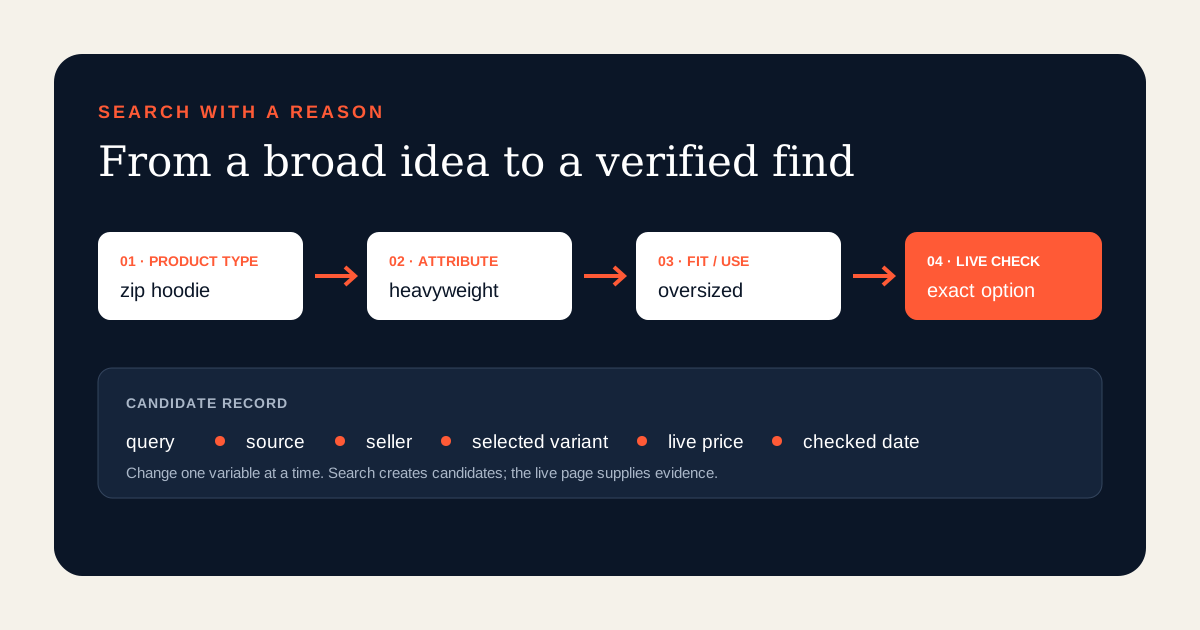
Start with four possible blocks: product type, defining construction, intended use or fit, and an optional variant. For example, begin with “zip hoodie,” add “heavyweight,” then “oversized,” and only then add a color or material term if it matters. You do not need every block in the first search. The ladder works because each new term has a reason: it should remove an unwanted result class or reveal a feature you can later verify.
Use concrete nouns before adjectives. “Canvas messenger bag metal buckle” carries more information than “premium trendy bag.” Keep marketplace-language uncertainty in mind. A seller title may translate imperfectly, so try a plain synonym when a precise English phrase produces little. Record each query exactly. If you cannot reconstruct which terms produced a candidate, you cannot maintain the find when prices, options or links change.
Begin broad enough to learn the vocabulary
The first search is reconnaissance. OOPBuy’s public interface currently accepts a product name or a product link, and result pages may show related searches alongside marketplace-labelled cards. Scan the repeated nouns in titles, the option language and the product families that appear. You are learning how sellers describe the category, not choosing a winner. Note useful neutral terms and reject obvious noise.
Do not copy every suggested phrase. A related search is evidence that a phrase is associated with the result set, not an endorsement of quality, authenticity or availability. Add one promising term to the next query and observe what changes. If the new term removes relevant products, step back. If it removes the wrong product type while preserving the feature you need, keep it. This one-change discipline makes the search path explainable.
Narrow one constraint at a time
After mapping the category, choose the constraint that matters most. For shoes it may be size range or construction; for a bag, dimensions or closure; for a jersey, sleeve type or customization. Add that constraint and compare the new set with the previous set. Only after the first constraint works should you add a second. Stacking six terms at once can hide whether the vocabulary is wrong or the desired listing simply is not present.
Use negative judgment manually rather than assuming unsupported search operators. If irrelevant accessories dominate, identify the noun that distinguishes the main item. If branded or restricted goods appear, do not treat visibility as route eligibility. Search visibility only means the interface returned a candidate. Purchasing restrictions, intellectual-property risk and available shipping routes require their own current checks before payment.
Read source labels before comparing prices
Current public result pages can label candidates from sources such as Taobao, 1688 and Weidian. Keep that source attached to the row. These marketplaces do not always express options, minimum quantities or price tiers in the same way. A 1688 headline price may relate to a quantity tier; another card may show a starting option. Two similar photographs across different sources therefore are not automatically equivalent offers.
Compare like with like: same product type, intended option, quantity basis and currently selected variant. If those fields are unknown on the card, leave the comparison provisional. The result page helps you decide which pages deserve inspection; it is not a final quote. Saving the source label also makes recovery easier if a shared or converted link later stops working.
Use price sorting without choosing the cheapest card
Price sorting can reveal the shape of a category. Sort low to high to identify accessory-only cards, deposits, tiny sizes or quantity tiers that create an unrealistically low starting figure. Sort high to low to see whether material, bundle size or customization changes the offer. The useful information is the pattern, not the first card. Never infer quality from position or assume that a displayed card price applies to your option.
Create a comparison window instead of a single threshold. Open several candidates from the relevant middle and edge of the range. On each live page, select the intended color, size, model and quantity, then record the source-currency price and seller-to-warehouse freight separately. If the selected price differs from the card, the live selection wins. International shipping remains a later parcel cost.
Move from discovery card to live listing
A candidate becomes saveable only after the live product page resolves. Check that the source item, seller and title family match the card you opened. Select every required option. Read the quantity basis, domestic freight and any purchase reminder. If the page says the item is unavailable, the link expired or the store closed, record the state and return to the candidate set. Do not guess a replacement from a similar image.
OOPBuy product pages can expose risk or purchase notices. Treat a notice as listing-specific decision data, not as a promise about every item in the category. A result can be visible and still be unsuitable for the buyer’s route, risk tolerance or return needs. The correct outcome may be “needs clarification” or “reject,” which is more useful than forcing every search into a purchase.
Keep a small, reproducible candidate table
For each promising result, record the exact query, check date, source marketplace, submitted URL, landing URL, seller, selected option, quantity basis, source price, domestic freight, notice topic and status. Add one sentence explaining why it matches using observable fields. “Navy, XL option, zip construction and visible size chart” is reproducible; “amazing quality” is not.
Limit the shortlist to a number you can verify. Five well-documented candidates are usually more useful than fifty image matches. Mark a row as candidate, needs clarification, verified, unavailable or rejected. Preserve failed rows instead of silently overwriting their links, because that history explains why a replacement was added and prevents an old QC record from being attached to a different seller.
Recover when keywords produce poor results
If the result set is empty or noisy, diagnose one layer at a time. Replace a promotional adjective with a construction term. Try a common synonym for the product noun. Remove the least important variant. Search the product family before the exact model. If you already possess a valid source URL, stop keyword searching and use the link-verification workflow instead. Image search is a separate recovery path where the current interface supports it, but a visual match still needs full listing verification.
When a once-useful query degrades, keep the old query and date, then create a new version. Seller titles and available inventory change. A reproducible search log lets you see whether the vocabulary changed or whether a particular listing disappeared. It also prevents a spreadsheet from presenting stale discovery dates as current evidence.
Final search-to-save checklist
Define the product decision. Build a query from product type plus one meaningful attribute. Scan related terms for vocabulary, not endorsement. Narrow one constraint at a time. Keep the marketplace source. Use price sorting to study the range, not to select blindly. Open several live pages, select the intended option and record current commercial fields. Read availability and risk notices. Save the exact query and check date. Verify again immediately before payment.
The goal of keyword search is not maximum result volume. It is a short trail from an understandable buying need to candidates whose identity and selected offer can be reproduced. That trail gives a first-time product finder something stronger than a random link: a reasoned shortlist with visible limits.
Research record
Source titles are listed without outbound platform links. They document OOPBuy’s published interface on the fact-check date; they do not prove that a particular seller or listing is reliable.
- OOPBuy public home and product searchCurrent search input for a product name or link and the separate image-search entry point.
- OOPBuy public product-result pagesCurrent related-search suggestions, source labels, price sorting and result-card fields.
- OOPBuy public Taobao, 1688 and Weidian product pagesCurrent option, price, domestic-freight, availability and purchase-notice fields used for final verification.
- OOPBuy public availability and risk messagesCurrent expired-link, closed-store, unavailable-item and purchase-reminder states.