
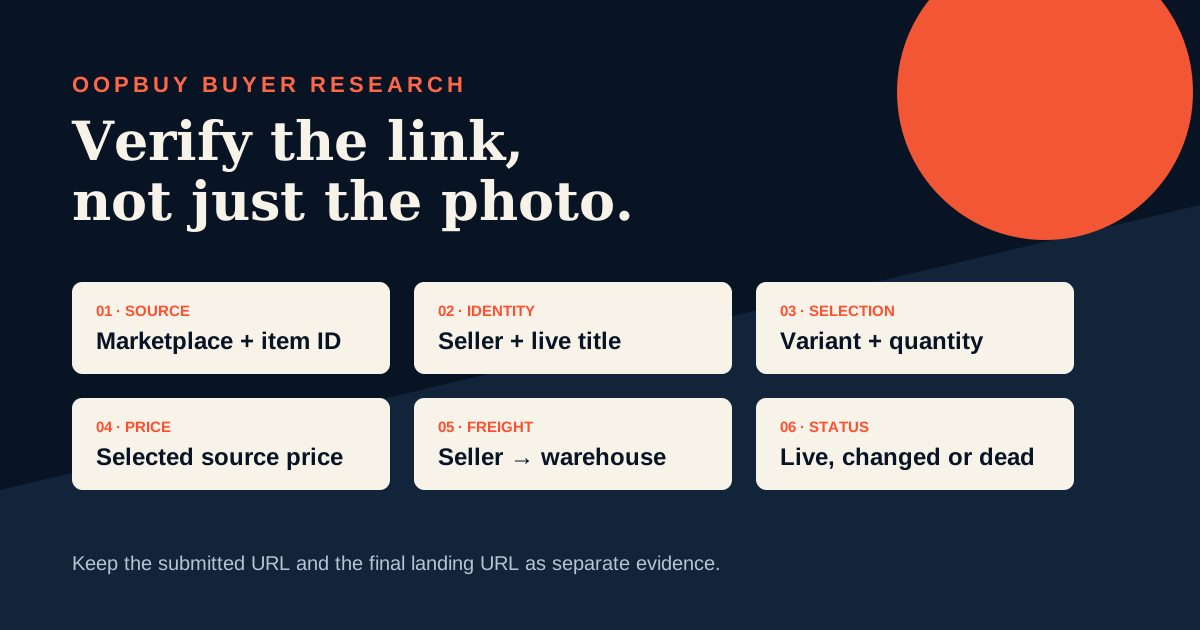
A link is a starting point, not a verified find
Product-link verification answers a narrower question than a general spreadsheet guide: does this saved URL still lead to the same buyable offer you meant to record? Product images travel between spreadsheets, messages and seller pages, while titles, variants and prices change. Two listings can use the same photograph without offering the same material, size set, quantity or seller service. Start with the live page, not with the label someone added to a row weeks ago.
For every candidate, use one of four outcomes: verified, needs clarification, unavailable or reject. Verified means the marketplace, seller, option and current commercial fields are identifiable. Needs clarification means one answer—such as a quantity basis or an ambiguous variant—could make it usable. Unavailable means the current page cannot be ordered. Reject means the evidence conflicts with the intended product or shows a risk you will not accept. This vocabulary keeps a spreadsheet honest.
Confirm the marketplace before comparing anything else
OOPBuy currently accepts product names or product links and exposes public product routes for marketplace sources including Taobao, 1688 and Weidian. The source matters because fields and option logic differ. Save both the source marketplace and the complete original URL. Do not rename every source as “Taobao link” merely because Taobao is familiar; that destroys information needed when a page fails or when two offers must be compared.
After pasting a URL into the live search field, check the resulting product page or the platform message. The destination should still identify the expected source and product. If OOPBuy cannot parse the link, a DIY or manual-order path may appear, but manual entry does not prove that your interpretation is correct. Preserve a screenshot-free text record: marketplace, source item number when visible, seller name, date checked and final status.
Follow redirects without losing the original evidence
A shared link may contain referral, campaign or mobile parameters and may redirect to another address. Open it safely, let the page reach its final destination, then keep two fields: “submitted URL” and “landing URL.” They answer different questions. The submitted URL lets you reproduce what was shared; the landing URL shows what the service resolved today. Never replace the original with a guessed clean link unless the destination is demonstrably the same item.
Redirects are not automatically suspicious. Marketplace mobile links and campaign links often redirect. The warning sign is an identity change: a different item number, store, title family or option set. When that happens, mark the row for clarification rather than deciding that similar photos make it equivalent. If the final page says the item is unavailable, the link expired or the store closed, record that exact state and stop. Do not invent a replacement seller.
Verify seller and listing identity
Next, confirm the seller or shop. Record the visible store name and any seller identifier the live page provides. Compare it with the saved row, but do not treat a matching display name as absolute proof because names can be similar. Stronger identity comes from several aligned fields: source item number, seller, title, option family and product images. If only the image matches, the evidence is weak.
Read the current title for product type and important qualifiers. A title may reveal material, generation, set size, preorder status or another limitation that a short spreadsheet name omitted. Do not translate a vague title into a stronger claim. “Cotton-style” is not proof of a fiber percentage; a branded-looking image is not proof of authenticity. Product-link verification should preserve what the seller states and clearly mark what remains unknown.
Match the exact option, quantity and price basis
A headline price is rarely enough. Select the exact color, size, model, bundle and quantity that the saved find describes. On 1688 in particular, the live page may present quantity-dependent prices or purchase-unit choices; use the value attached to your intended quantity, not the cheapest visible tier. On any marketplace, a low default price may belong to an accessory, deposit or smallest option. The selected state is the evidence.
Record price in the source currency, the option text exactly as shown and the quantity basis. If the page requires two option axes, save both. If a size is unavailable, do not keep the old row price as though the desired option remains orderable. Currency conversion belongs in a separate planning column because exchange rates and payment costs can change; the source-price field should remain a faithful snapshot of the live listing.
Separate seller-to-warehouse freight from international shipping
The product page may show a domestic freight field for the seller-to-warehouse leg. Record it separately from the item price. A zero, included or calculated-later value should be copied as displayed, not converted into a universal promise. Multiple items from one seller may be combined by that seller, while items from different sellers travel to the warehouse separately; verify the live order breakdown before assuming one domestic charge.
International shipping is a later parcel decision and cannot be verified from the product link alone. Weight and dimensions on an early page are planning inputs, not proof of the final packed parcel. This separation prevents a cheap item from looking artificially complete. A reliable row has at least three cost fields: selected item price, seller-to-warehouse freight and an intentionally blank international-shipping field until warehouse or parcel evidence exists.
Treat risk reminders and restrictions as decision data
OOPBuy public product pages can display risk reminders or restrictions before purchase. Read the notice attached to the specific listing. It may affect purchasing, route availability or after-sales handling, but it should not be generalized to every item in the same category. Save the notice topic and the date, then decide whether you can verify an eligible path before paying.
Do not hide a reminder because a spreadsheet promises that an item is “safe.” A product finder cannot guarantee customs treatment, authenticity, route availability or delivery. If the page blocks the item, requires confirmation or shows no eligible order path, the responsible status is needs clarification or reject. A find becomes useful when its limitations are visible, not when the row is made to look complete.
Recover correctly from dead or changed links
When a link fails, first retry the original URL without editing its item identifier. Check whether the landing page names the reason: unavailable item, expired link or closed store. Then search using stable evidence such as the exact product title, seller name, item number or a distinctive model term. Image search may help discovery where the live interface supports it, but a visual match is not proof that a replacement has the same seller, specifications or price.
Create a new candidate row for any replacement. Keep the dead row with its last-check date and failure state so history is not rewritten. Compare the replacement through the complete workflow: source, seller, options, quantity, price, domestic freight and risk notice. Linking the two rows as “possible replacement” is accurate; silently changing the URL beneath an old title makes later QC and price records impossible to audit.
Use a reproducible verification row
A compact evidence row should contain: submitted URL, landing URL, marketplace, source item number, seller, exact option text, intended quantity, source price, domestic freight, risk note, checked date and status. Add a short “why it matches” note using observable facts. For example: “same item number, seller and navy/XL option; live price recorded.” Avoid notes such as “best quality” unless there is verifiable evidence for that claim.
Before ordering, have another person—or your future self—reopen the landing URL and reproduce the selection. If they cannot find the same option and price, the row is not verified. Recheck immediately before payment because a check from last month is historical evidence, not a live promise. After purchase, keep the chosen option and seller record so warehouse QC can compare the received item with the decision actually made.
Final pre-order checklist
Confirm the source marketplace, original URL and final landing page. Match the source item number and seller. Select every required option and the intended quantity. Record the live source price and domestic freight separately. Read any purchase notice or restriction. Mark unavailable or changed links honestly. Keep replacements in new rows. Recheck the live selection before payment, then save the option record for warehouse QC.
The goal is not to make every link pass. It is to prevent an uncertain lead from masquerading as an order-ready find. A smaller spreadsheet with reproducible evidence is more useful than hundreds of links whose seller, option and current price cannot be reconstructed.
Research record
Source titles are listed without outbound platform links. They describe OOPBuy’s published interface and workflow, not independent proof that a particular listing is accurate or available.
- OOPBuy public home and product searchCurrent input for product names or links, marketplace product routes and manual-order entry points.
- OOPBuy public Taobao, 1688 and Weidian product pagesVisible marketplace identity, option, price, domestic freight, status and risk fields.
- OOPBuy product availability messagesCurrent unavailable-item, expired-link and closed-store states.
- OOPBuy ordering and logistics noticesPublished separation between seller dispatch to the warehouse and later international parcel submission.