
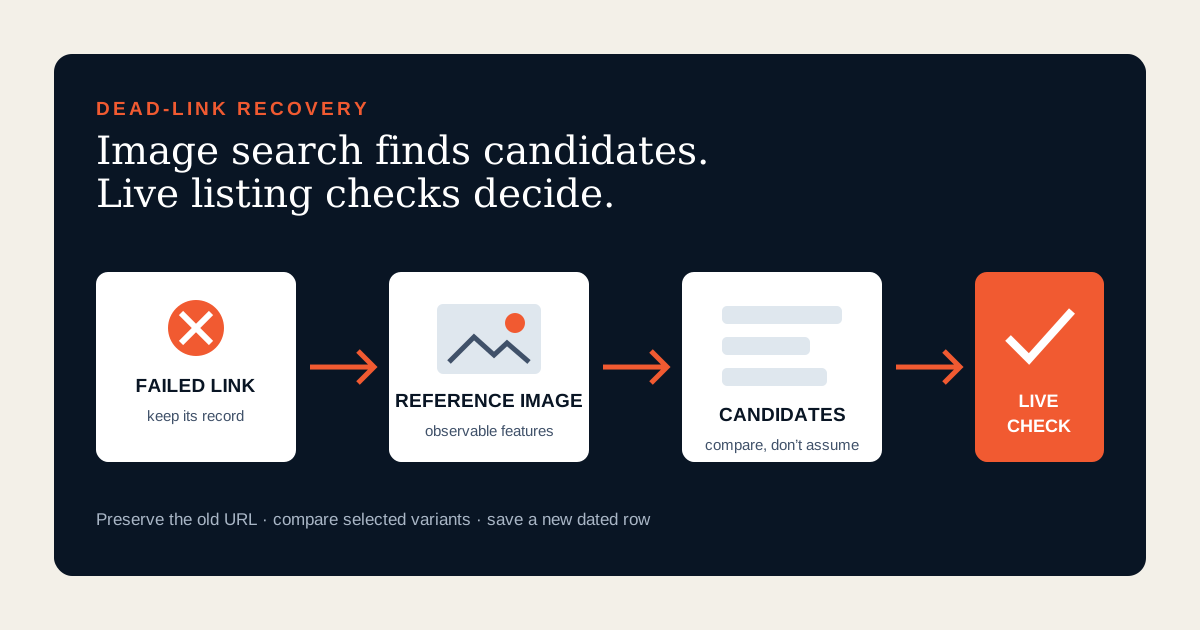
Preserve the dead link before trying to replace it
An expired product page is still useful evidence. Before opening OOPBuy image search, keep the original URL, source marketplace, seller name if known, saved title, selected color or size, quoted price, check date and any QC reference. OOPBuy’s current public product pages explicitly use unavailable states such as item unavailable, link expired or store closed. Those messages explain why a recovery attempt began; they do not identify an equivalent replacement.
Do not overwrite the failed row. Mark it unavailable and create a recovery case beside it. A silent replacement breaks the connection between the old seller, option and any warehouse evidence. It can also make an old price or QC photo appear to belong to a new listing. A first-time finder needs the history because “looks similar” and “is the same offer” are different claims.
Understand what OOPBuy image search can prove
OOPBuy’s current public interface provides an image-upload search entry alongside text or link search. That supports a practical discovery use: submit a reference image and inspect visually related candidates. It does not establish that the highest result comes from the old seller, uses the same factory, contains the same materials or offers the same variant. Visual similarity is a clue, not product identity.
Separate three questions. Does the candidate resemble the reference? Does its live page describe the attributes you need? Is the selected offer acceptable now? Image search helps with the first question. The live product page and your comparison record answer the second and third. This boundary prevents a familiar photo from becoming an unsupported claim about quality, authenticity or seller reliability.
Build a reference image around observable features
Use the clearest lawful image already attached to your own discovery record: for example, a seller image you saved with its source context or a crop from a public listing you are actively checking. Do not upload private QC, address, payment, chat or customer material. Keep the original source note so the image is not presented as your own product photograph.
Choose a view that exposes discriminating features rather than a lifestyle background. For shoes, that might be the panel layout, sole shape and closure. For a hoodie, it might be zipper construction, pocket shape and visible fabric texture. For a bag, use proportion, handle attachment and hardware placement. Crop away unrelated products when needed, but do not edit colors, remove marks or invent detail. A cleaner query image can improve comparison; a manipulated image corrupts it.
Write a small feature fingerprint before searching: product type, shape, color family, construction details, approximate proportions and any visible label that can be read reliably. This fingerprint becomes the comparison standard when results begin to look deceptively alike.
Run the search as a candidate-building step
Open the current OOPBuy image-search entry and upload the reference. Save the search date. Do not select the first visually close card. Open a manageable set—often four to eight candidates is enough for careful checking—and preserve each landing URL. If the result set is noisy, try another genuine angle or a tighter crop focused on the most distinctive construction feature. Do not keep changing the reference until one preferred seller appears; that turns recovery into confirmation bias.
Record the marketplace source shown for each candidate. The old link may have come from Taobao while a visual result resolves to 1688 or Weidian. That can change quantity basis, options, seller information and domestic freight. A cross-market result is not wrong, but it must be treated as a new offer, not as a continuation of the dead page.
Compare candidates with a visible-feature table
| Field | What to record | What not to assume |
|---|---|---|
| Shape and construction | Panels, seams, closure, sole, pockets or hardware | Same factory or batch |
| Proportions | Visible dimensions and size chart where supplied | True scale from a styled image |
| Color and finish | Selected option name and current images | Exact color under different lighting |
| Seller and source | Live seller, marketplace and landing URL | Relationship to the old seller |
| Commercial offer | Selected price, quantity basis and domestic freight | Card price for your variant |
Score only observable matches. “Same pocket geometry and visible measurement table” is useful. “Same quality” is not. If two candidates use the same promotional image, that does not make their options, materials or fulfillment identical. Keep both separate until their live fields have been checked.
Leave the image results and verify the live listing
A replacement is not ready to save until its product page resolves and every required option can be selected. Confirm the source marketplace, seller, title family, color, size or model, quantity basis, current source-currency price and seller-to-warehouse shipping. Read any availability, risk or purchase notice. OOPBuy’s public pages distinguish seller-to-warehouse delivery from the later warehouse-to-address stage, so do not confuse domestic freight with final international shipping.
Check whether the selected option still shows the features that caused the visual match. A result card may use one hero image while the affordable variant is a different size, set or accessory. If the page is itself unavailable, preserve that failed candidate and continue. If a required field is unclear, mark “needs clarification” rather than filling the spreadsheet with a guess.
Use the full product-link verification workflow for the final candidate. Image search finds a door; live verification determines what is behind it.
Use keyword search when visual recovery stalls
Image search can fail because the reference is generic, dominated by styling, too small or no longer represented in current inventory. Switch methods rather than forcing a weak result. Extract neutral words from the feature fingerprint: product noun, construction, material if visibly supported, shape and one important variant. Run those through the OOPBuy keyword-search workflow, then compare the new live candidates with the same table.
The two methods solve different problems. Image search is good at surfacing visual neighbors when vocabulary is missing. Keyword search is better when a construction term, size requirement or category boundary matters more than appearance. A strong recovery case can retain both query paths and explain which produced the final candidate.
Update the spreadsheet without erasing history
Create a new row for the replacement. Link it to the failed row with a recovery ID. Record the new marketplace, seller, URL, selected option, price, domestic freight, check date, query image source note and verification status. Keep old QC dates and images with the old row. They do not transfer to a different listing.
Use statuses that describe evidence: candidate, live page checked, option confirmed, needs clarification, unavailable or rejected. Add one sentence explaining the match and one sentence naming the remaining uncertainty. Schedule another live check immediately before payment because inventory, variants and prices can change after discovery.
If the old listing returns, do not automatically restore it. Recheck its seller, options and current offer as if it were a new candidate. Recovery history is valuable precisely because it prevents a familiar URL from bypassing today’s evidence.
A dead-link recovery example
Imagine a saved hoodie row whose page now reports an expired link. The record preserves a zip front, two separate pockets, a visible measurement chart, dark navy color and size XL. The reference image produces six visually similar results. Three show a pullover, one resolves to an accessory, and two retain the zip construction. Only one of those two offers an XL option with a current chart; its seller, price and domestic freight differ from the original.
The correct spreadsheet action is not “link fixed.” It is “new candidate added.” The old row remains unavailable. The new row records the live option, commercial fields and date, then waits for a final pre-payment check. The example uses no claim that the new hoodie shares quality, batch or factory with the old one. It demonstrates the difference between recovering the buying requirement and pretending to recover the exact product.
Image-search recovery checklist
Preserve the original URL and failure message. Keep old seller, option, price and QC evidence attached to the old row. Use a lawful reference image with its source note. Write an observable feature fingerprint. Upload through the current image-search entry. Open several candidates and record their marketplaces. Compare construction, proportions and selected options. Verify seller, quantity basis, live price, domestic freight and notices on each live page. Reject visual matches that fail the required option. Use keyword search if the image set is weak. Add the replacement as a new dated row. Recheck immediately before paying.
The goal is not to make a dead link look alive. It is to recover a buyer’s requirements through a transparent trail from old evidence to new candidates. When every change is recorded, image search becomes a disciplined discovery tool rather than a shortcut that hides uncertainty.
Research record
Source titles are listed without outbound platform links. They document the public interface on the check date and do not prove equivalence, seller reliability, material quality or authenticity.
- OOPBuy public home and search interfaceCurrent link-or-name search and the separate image-upload search entry.
- OOPBuy current public product pagesCurrent marketplace, seller, option, price, domestic-freight, estimated-field and two-stage delivery context.
- OOPBuy public unavailable-item messagesCurrent item-unavailable, expired-link and closed-store states used to identify a recovery case.
- OOPBuy public risk and purchase noticesCurrent listing-level reminders that must be reviewed on the replacement page.